Your invoice email just landed in spam, and the content wasn't the problem. The DNS was. SPF, DKIM and DMARC are the three records that decide whether mail from your domain reaches the inbox at all: SPF lists which servers may send for you, DKIM puts a tamper-proof signature on each message. DMARC ties both to the From address people actually see, then tells receivers what to do when a check fails. Since 2024, Gmail and Yahoo refuse bulk mail that skips them, so none of this is optional anymore. Here's how the trio fits together and the order we deploy it in, without the classic accident: blocking your own newsletters and invoices on day one.
The short answer
SPF publishes the list of servers allowed to send mail for your domain, and DKIM puts a cryptographic signature on each message. DMARC ties both to the From address users see and tells receivers what to do when checks fail: deliver, quarantine or reject. All three live in DNS as TXT records, and you deploy them in exactly that order.
Why receivers stopped trusting the From header
SMTP was designed in an era when forging a sender address counted as a feature. Anyone can put anything in the From header, the protocol doesn’t care, and phishing built a whole business on that for decades. SPF, DKIM and DMARC are the retrofit: DNS records that let a receiving server ask “should I believe this message really comes from that domain?”
Then February 2024 happened. Google and Yahoo started requiring authentication for anyone sending bulk mail to their users, DMARC record included. Skip the records and your newsletters land in spam or bounce at the door, however clean the content is. Deliverability is an infrastructure property now.
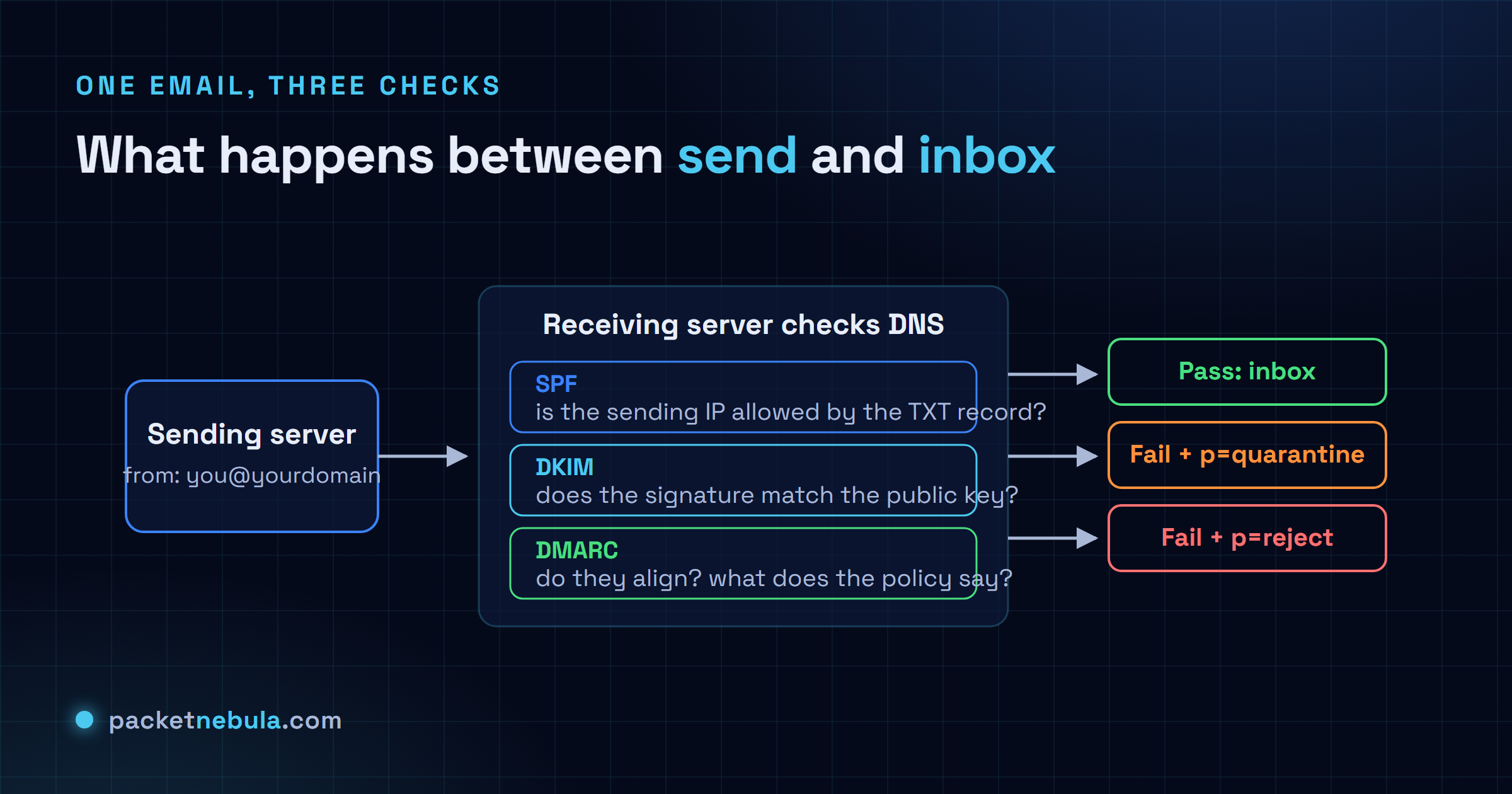
Receiving server checks DNS
SPF: the guest list
SPF is a TXT record on your domain that lists the servers allowed to send
mail claiming to be you. A typical record reads
v=spf1 include:_spf.google.com include:servers.mcsv.net ~all:
Google Workspace may send, Mailchimp may send, treat everyone else with
suspicion. The receiving server checks the connecting IP against that list
during the SMTP conversation.
Two traps have cost us real debugging hours. First, the lookup limit. RFC 7208 allows at most 10 DNS lookups per evaluation, includes count recursively, and a record over budget returns a permanent error. Audit yours with a DNS lookup on the TXT record and count what each include pulls in. Second, the scope. SPF validates the envelope sender (the bounce address), not the From header your users see, so a message can pass SPF while showing a completely forged From line. That’s exactly the hole DMARC closes.
Forwarding breaks SPF by design: the forwarder’s IP isn’t on your list. Not a bug. It’s the reason DKIM exists.
DKIM: the tamper-evident signature
DKIM signs selected headers and the body of each outgoing message with a
private key; the matching public key sits in DNS at
selector._domainkey.yourdomain.com. Any receiver can fetch the
key and verify the message came from your infrastructure and hasn’t been
touched since. And because the signature travels inside the message, it
survives forwarding. SPF doesn’t.
Operationally it’s the easiest of the three: your mail provider generates the keys and you publish one CNAME or TXT record per selector. Flip the switch, done. Use 2048-bit keys (1024 is legacy), and rotate selectors when someone with access to the signing infrastructure leaves. The one self-inflicted wound to avoid: mailing-list software and ticketing systems that rewrite subjects or footers will invalidate signatures on relayed mail. Sign at the final hop, not three systems upstream.
DMARC: the policy that makes the other two matter
DMARC is the keystone. Published at _dmarc.yourdomain.com, it
declares: for mail whose visible From is my domain, check that SPF or DKIM
passes and aligns (the domain that passed matches the From domain). If
neither does, the policy says what happens next: p=none (just
report), p=quarantine (spam folder) or p=reject
(bounce). Alignment is the crucial mechanic. It welds the technical checks to
the address human beings actually read, and that’s what makes exact-domain
spoofing fail. The spec is
RFC 7489.
DMARC also gives you eyes. The rua tag requests daily aggregate
reports from every major receiver: which IPs sent as your domain, what
passed, what didn’t. The first week of reports is reliably humbling. Most
organizations discover a billing system or some old marketing tool sending
legitimate mail that authenticates as nothing.
Deploying without burning your own mail
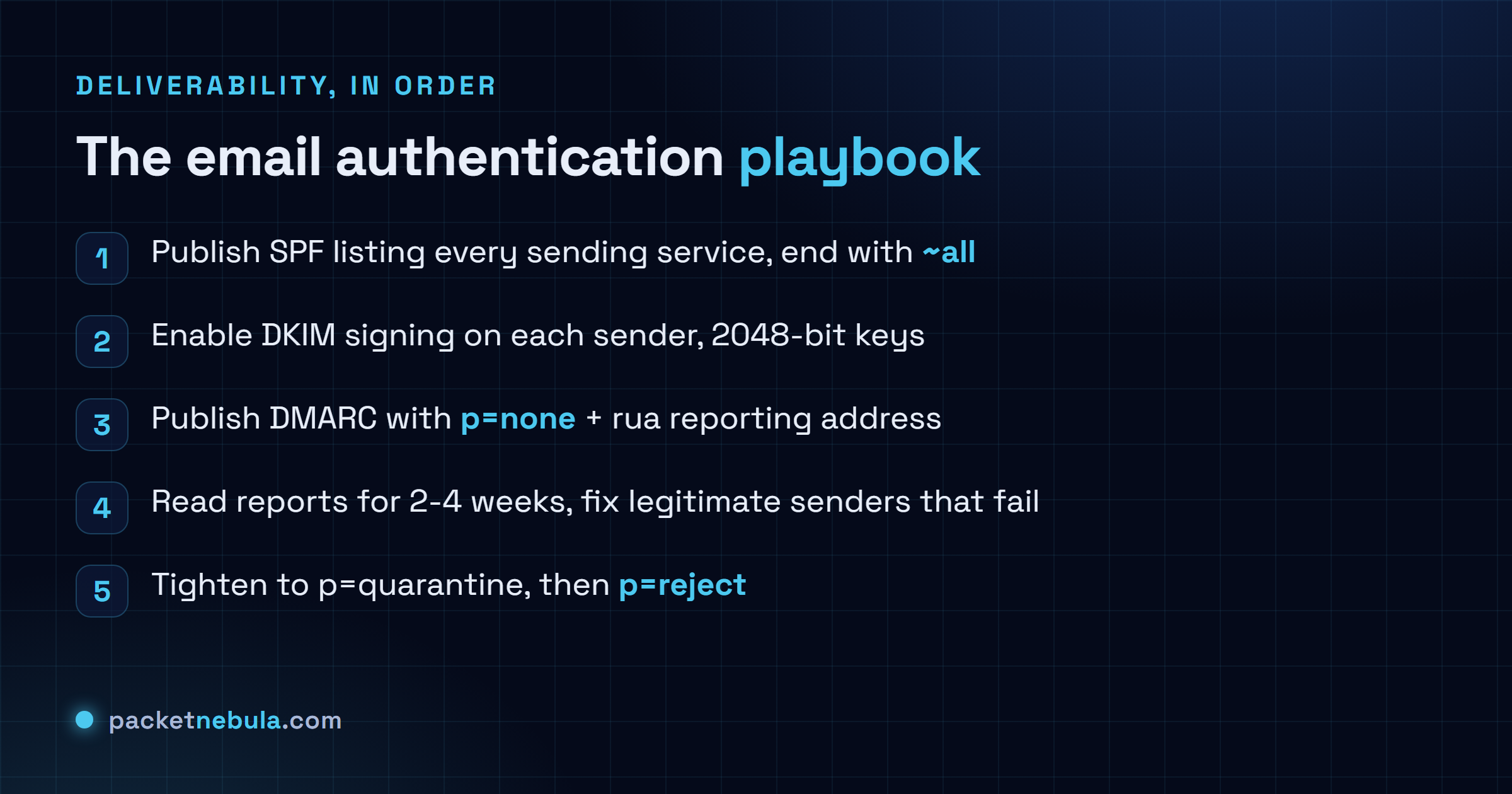
The order of operations protects you. Publish SPF, enable DKIM on every
sender, then publish DMARC at p=none with a reporting address
and wait two to four weeks. Read the reports, fix every legitimate source
that fails (usually by adding an include or enabling a provider’s DKIM), and
only then ratchet the policy: p=quarantine, optionally with
pct=25 to phase it in, and finally p=reject.

The classic failure is jumping straight to p=reject on day one,
then discovering that payroll notifications came from an unauthenticated SaaS
nobody documented. The reports exist so that surprise happens in a dashboard
instead of HR’s inbox.
Verify the whole thing from outside. Query the three records with the DNS lookup tool, then send a test to a Gmail account and hit “Show original”, which lists the SPF, DKIM and DMARC verdicts line by line.
The bonus level: your logo in the inbox
Reaching p=reject unlocks one extra: BIMI (Brand Indicators for
Message Identification), yet another DNS record, this one pointing at an SVG
of your logo. Gmail, Yahoo and Apple Mail display it next to your messages,
but only for domains whose DMARC policy is at enforcement, and the big
providers additionally want a Verified Mark Certificate, which means a
registered trademark and a few hundred dollars a year. Honestly, I’d call the
certificate vanity for most organizations. The prerequisite isn’t. BIMI is
the industry’s way of paying senders to finish their DMARC rollout, and it
works.
Three TXT records, an afternoon of setup, a few weeks of reading reports. After that, exact-domain spoofing against your domain just stops working.
Frequently asked questions
Do I need all three records or is SPF enough?
All three. SPF alone breaks on forwarding and doesn't protect the From address people actually read. DKIM alone says nothing about mail that arrives unsigned. DMARC is the piece that welds both to the visible From domain and tells receivers what to do on failure, and since 2024 Gmail and Yahoo require it for bulk senders anyway.
What is the difference between ~all and -all in SPF?
The tilde (~all, softfail) asks receivers to treat unlisted senders with suspicion but not refuse them outright; the dash (-all, hardfail) asks for rejection. Honestly, in a DMARC world the difference matters less than people think, because DMARC policy decides the final outcome. Most deployments we see run ~all and let DMARC do the enforcing.
Why does my SPF record fail with too many DNS lookups?
SPF caps mechanism lookups at 10 per check (RFC 7208). Every include, a, mx and redirect costs one, and includes of includes count too. Stack enough SaaS senders and you blow the budget, at which point receivers may treat the whole record as a permanent error. The fix: drop dead includes and use ip4/ip6 blocks where you can. An SPF flattening service works too.
What does p=none actually do?
Nothing to your mail flow, everything for your visibility. With p=none, receivers deliver mail exactly as before but send you aggregate reports showing which sources pass and which fail. It's the observation phase. You deploy it first, watch the reports until every legitimate sender passes, then tighten.
Can SPF, DKIM and DMARC stop all spoofing?
They stop exact-domain spoofing: nobody can pass DMARC while forging yourdomain.com in the From header. They do nothing against lookalike domains (yourd0main.com) or display-name tricks, and a compromised legitimate account sails straight through. Necessary, not sufficient. The rest is user training and filtering.